Pulse: A Single Command Palette for Neovim
If you use Neovim, you know how useful quick search and navigation tools like fuzzy finders and symbol pickers are. I built pulse.nvim because I wanted a single command palette to switch between different kinds of searches, without multiple keymaps and complex setups.
With AI, context switching has become a thing, with so many tools to manage. I am spending more and more time reviewing code than writting it, and I wanted a tool that would let me quickly jump to the code I needed without breaking my flow.
What Pulse Is
Pulse is a lightweight command palette and jump panel for Neovim. Instead of splitting every search or picker into its own command, plugin, and or different plugins, Pulse consolidates them under a single, consistent interface with prefix-based mode switching.
You can use it to quickly jump to:
- File search
- Command execution
- Git status
- Diagnostics
- Symbols (current buffer and workspace)
- Live grep
- Fuzzy search (current buffer)
How it Works
Pulse uses a simple prefix system to switch between modes. For example, you can
type a prefix followed by a query:
Commands (:)
It wouldn't be a command palette without the ability to run commands.
Just type : followed by your command and Pulse will execute it.
Files (no prefix)
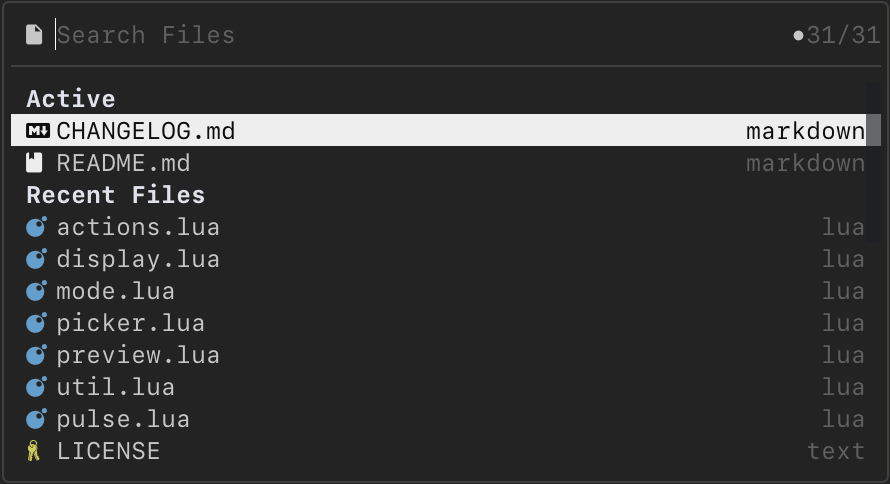
To search for files, you don't need a prefix just open the panel and start typing:
- Open the command palette with a keymap (e.g.,
<leader>p) - Start typing to search for files in the current workspace
- Use arrow keys or fuzzy matching to select a file
- Press Enter to open the selected file
- When empty the active buffers and recent files will show up
Git Status and Diagnostics (~, !)
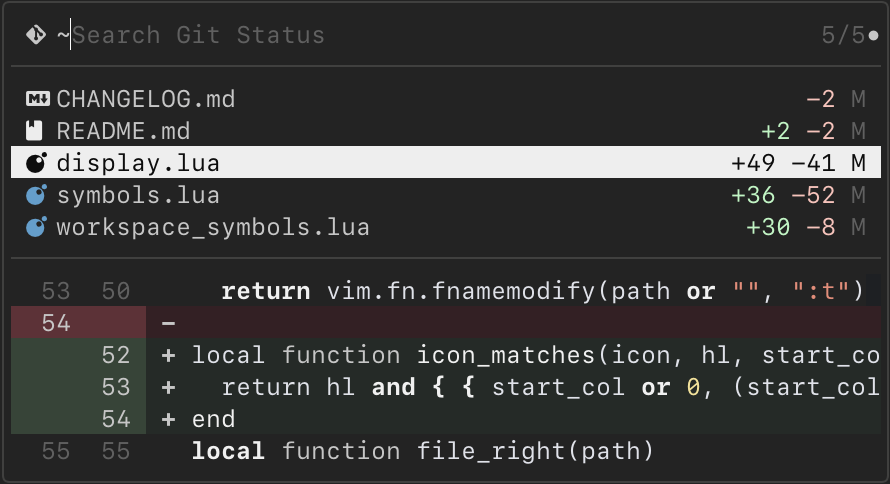
Pulse will show you the current git status of your project:
- Open the command palette with a keymap (e.g.,
<leader>p) - Type
~to switch to git status mode or!for diagnostics - See a list of modified, added, and deleted files
- Use arrow keys to navigate the list
- A preview will show for the selected file
- Press Enter to open the selected file
Symbols (@, #)
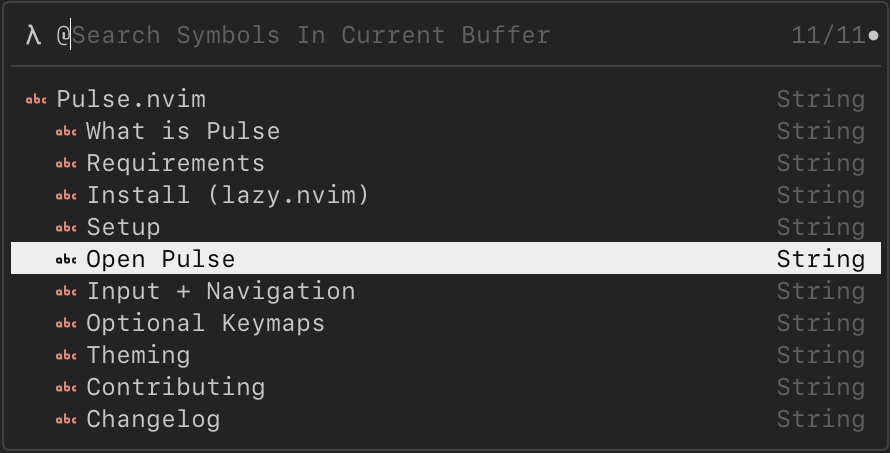
Quickly navigate to symbols in your code:
- Type
@to search symbols in current buffer, or#for workspace - See a list of symbols in the current buffer or workspace
- Use arrow keys to navigate the list
- A preview will show for the selected symbol
- Press Enter to jump to the selected symbol
Live Grep & Fuzzy Search ($, ?)
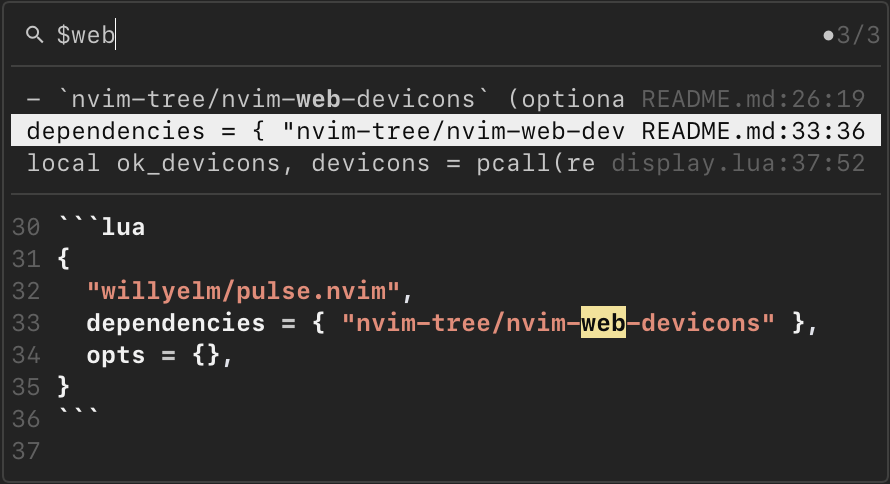
For more powerful searching, Pulse has live grep and fuzzy search modes:
- Type
$for live grep across the workspace or?for fuzzy search in current buffer - See matching results update in real-time
- Use arrow keys to navigate the results
- A preview will show for the selected result
- Press Enter to open the selected file or jump to the match
Why I Built It
Part of the fun of using Neovim is customizing it to fit your workflow. I love the flexibility of Neovim, but I also wanted to reduce the cognitive load of managing multiple tools for searching and navigation.
I wanted one entry point, much like Spotlight in MacOS:
- Fast to launch
- Minimal config
- Predictable UX
- One interface for all searches
In other words: less context switching in my workflow, and a cleaner mental model.
Example
Say you want to live grep for TODOs across your project: just open :Pulse and
hit $ to switch to live grep mode or assign a keymap <leader>l.
Then Start typing TODO, The panel filters immediately, and hitting <Tab> previews results
while keeping the panel open, letting you pick before jumping.
Why Not Telescope?
Telescope is powerful. It has a vast collection of pickers with many features and extensions.
But that’s exactly what I didn’t want. I didn’t want multiple entry points. I didn’t want multiple panels.
I wanted one palette. One surface. One mental model. This could have been a Telescope plugin. But the goal wasn’t another picker. The goal was a unified experience and full control over how the interaction feels.
How to Install
Pulse should work with any package manager but I tested it with lazy.nvim:
{
  "willyelm/pulse.nvim",
  dependencies = { "nvim-tree/nvim-web-devicons" },
  opts = {},
  keys = {
    { "<leader>p", "<cmd>Pulse<cr>", desc = "Open Pulse" },
  },
}
It’s fast, predictable, and reduces friction when switching between different kinds of searches. Because one panel with consistent navigation, you spend less time thinking about how to do a search and more time doing it.
What’s Next
This first version of Pulse is just the beginning. I think being able to review git status, better diffs, and merging tools would be a great next step, including:
- Better preview layouts
- More customization options (expand preview panels, multiple mode views, etc)
- Integrations (git diffs, AI code review, etc)
If it fits your needs, Try it out, file issues, share your workflows. I’d love to hear how pulse fits into your stack.